![logo_fidectus_4c-Dec-14-2021-07-11-26-75-PM.svg]](https://support.fidectus.com/hubfs/logo_fidectus_4c-Dec-14-2021-07-11-26-75-PM.svg)
The Create UTI Rule lets GEN generate a Unique Transaction Identifier (UTI) for your REMIT reports automatically, so your team no longer needs to create one by hand for each trade.
Once the rule is set up, GEN applies it while it processes new REMIT Table 1 or Table 2 reports. If a report arrives without a UTI, GEN generates one for you. You can also choose to have GEN replace UTIs that are already on the report, so all your reports follow the same format.
When the rule applies
|
Situation |
"Don't overwrite" |
"Override existing UTI" |
|---|---|---|
|
New Table 1 or Table 2 report, UTI field empty |
Generates a new UTI |
Generates a new UTI |
|
New Table 1 or Table 2 report, UTI already filled in |
Keeps the existing UTI unchanged |
Replaces it with a generated UTI |
|
Modification or cancellation |
Rule does not apply; original UTI kept |
Rule does not apply; original UTI kept |
The rule runs during OTC upload. It applies only to reports that match the document type, channel and transaction source you select when you set it up.
Modifications and cancellations always keep the UTI of the original report. This keeps every lifecycle event linked to the same transaction.
How to set up the rule
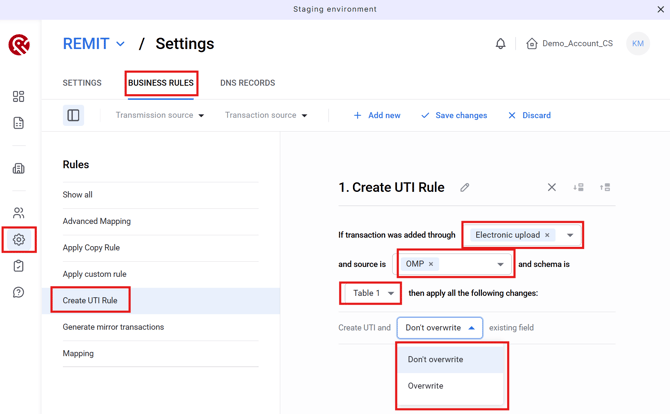
- Go to Company Preferences → Business Rules.
- Add the Create UTI Rule.
- Select the document type, channel and transaction source the rule should apply to.
- Choose how GEN should handle UTIs that are already on a report:
- Don't overwrite: GEN keeps an existing UTI unchanged and only generates one when the UTI field is empty.
- Override existing UTI: GEN replaces any UTI already on the report with a generated one.
- Save the rule.
From then on, GEN applies the rule automatically to every new Table 1 or Table 2 report that matches your settings.
Tip: If you're not sure which option to choose, we recommend starting with Don't overwrite. Your existing UTIs will stay as they are, and GEN will only fill in the ones that are missing.
FAQ
-
Will the rule change UTIs on reports I've already submitted?
No. The rule only applies to new reports while they are being processed. -
My report already has a UTI from my counterparty or trading platform. Will GEN change it?
Not if the rule is set to Don't overwrite. In that case GEN keeps the existing UTI unchanged. GEN only replaces it if you've chosen Override existing UTI. -
Why didn't GEN generate a UTI for my modification or cancellation?
This is intended. A modification or cancellation has to use the same UTI as the original report, so the rule doesn't run for these. -
Does the rule work for all REMIT tables?
It applies to new Table 1 and Table 2 reports. -
I need help setting up the rule.
We're happy to help. Please contact our Support team, and we'll walk you through the setup.