![logo_fidectus_4c-Dec-14-2021-07-11-26-75-PM.svg]](https://support.fidectus.com/hubfs/logo_fidectus_4c-Dec-14-2021-07-11-26-75-PM.svg)
You can assign, change, or remove a Portfolio directly in GEN, or receive Portfolio information automatically from your ETRM system via API.
Once a Portfolio is assigned, you can use it to filter and sort confirmations in the Confirmation Overview.
How does Portfolio information reach GEN?
Portfolio information can be added to GEN in two ways:
-
Via ETRM integration: If your ETRM system is connected to GEN via API, Portfolio information can be sent to GEN together with the relevant confirmation as internal metadata.
Note: no changes to the eCM Trade Confirmation are required, as Portfolio is not an eCM standard field. -
Manually in GEN: You can assign a Portfolio directly in GEN using the Set portfolio action.
Set a Portfolio
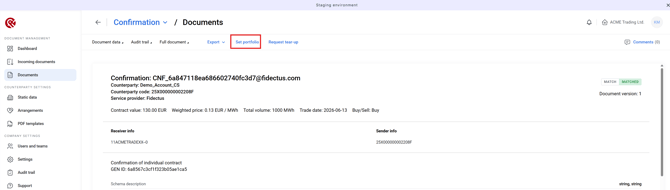
You can assign or change a confirmation's Portfolio in the Confirmation Documents → Set portfolio.
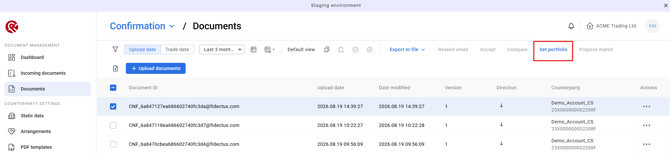
OR assign it in the Documents Details
Save a Portfolio view
You can save a view with your selected Portfolio filter. When you open the saved view again, the Portfolio filter will be restored automatically.
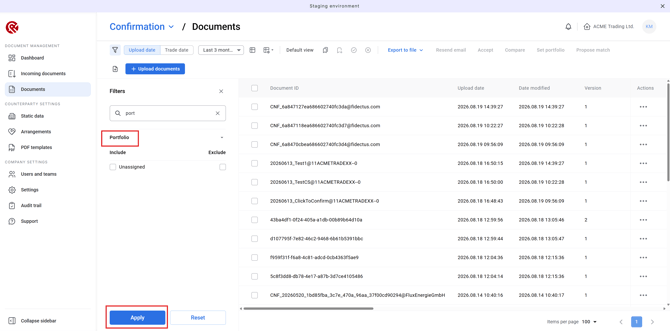
The Portfolio column also shows the portfolio assigned to each confirmation.
Important to know
Portfolio is internal GEN information used for organization and filtering. It:
- does not change your access or permissions
- does not change the eCM document exchanged with counterparties
- does not affect the normal confirmation workflow
If no Portfolio is assigned, the confirmation remains fully visible and is shown as Unassigned.