![logo_fidectus_4c-Dec-14-2021-07-11-26-75-PM.svg]](https://support.fidectus.com/hubfs/logo_fidectus_4c-Dec-14-2021-07-11-26-75-PM.svg)
A mirror transaction is a linked copy of an existing REMIT transaction that represents the same trade from the opposite reporting perspective.
Instead of manually creating a second transaction, GEN can generate a mirror transaction by reusing the information from the original trade and applying the necessary adjustments.
Mirror transactions help ensure consistency, reduce manual effort, and support REMIT delegated reporting scenarios.
Ways to create mirror transactions in GEN
Depending on your configuration and permissions, mirror transactions can be created in different ways.
1. Inside the document, select "Create mirror transaction"
The mirrored transaction will be immediatelly automatically created and sent to the related regulator (Acer and/or Elcom).
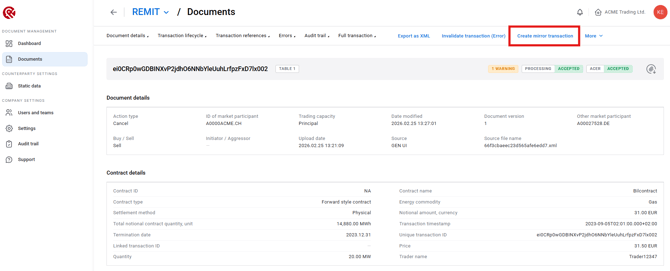
2. Select the existing transaction and click on "Create mirror transaction"
The mirrored transaction will be immediatelly automatically created and sent to the related regulator (Acer and/or Elcom).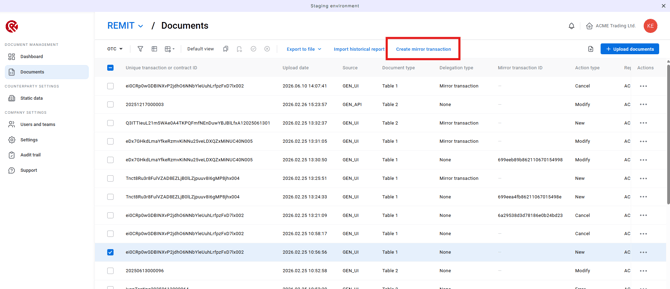
3. Upload a document (automatic mirror transaction creation)
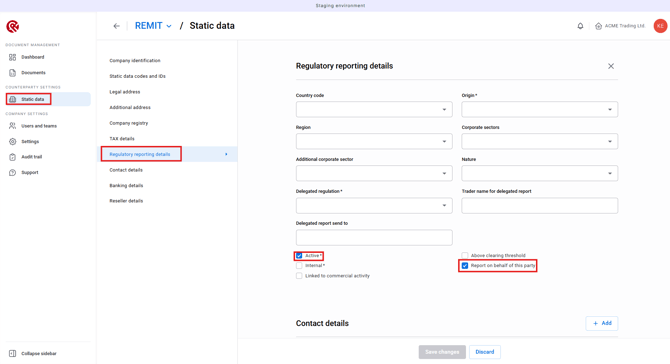
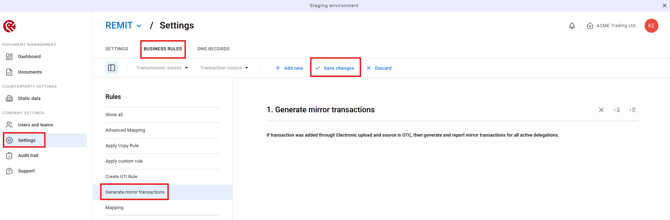
Mirror transactions can also be created automatically when uploading documents. For this to happen, the required prerequisites below must already be configured in GEN:
- Enable the Regulatory reporting details in the Counterparty Static Data
- Enable Business Rule
Important considerations
- Mirror transactions are linked to the original transaction.
- They do not represent separate economic trades.
- GEN prevents unnecessary duplication and generally will not create a mirror transaction if an eligible mirror already exists.
- The availability of automatic mirror creation depends on your system configuration and business rules.
Frequently Asked Questions
Does a mirror transaction create a new trade?
No. A mirror transaction represents the same economic trade from a different reporting perspective. It does not create a new commercial agreement or position.
Can mirror transactions be created automatically?
Yes. If the required prerequisites are configured correctly, GEN can automatically generate mirror transactions during document upload.
Why can't I create a mirror transaction?
Possible reasons include:
-
- A mirror transaction already exists for the selected trade.
- The transaction is not eligible for mirroring.
- Required prerequisites or business rules have not been configured.
If you are unsure, please contact your GEN administrator or Support team.
Summary
Mirror transactions allow the same REMIT trade to be represented from another reporting perspective without manually recreating the transaction.
In short:
- One economic trade
- Two reporting representations
- Automatically linked in GEN
- Created manually or automatically, depending on your configuration
This functionality helps improve consistency, reduce manual effort, and streamline REMIT reporting processes.